You probably heard about new, affordable, open weight/open source LLMs from providers other than Anthropic or OpenAI.
Take for example GLM 5.3 model from Z.ai. At the moment of writing, it has a score of 49 on Artificial Analysis Intelligence benchmark, while the currently highest ranking model, Claude Fable 5.1 from Anthropic has a score of 57.
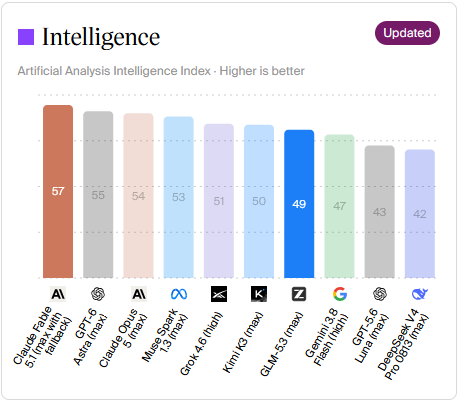
This is the current pricing for GLM 5.3 and Claude Fable 5.1 for uncached responses:
| Model | Input (1M tokens) | Output (1M tokens) | Intelligence Score |
|---|---|---|---|
GLM 5.3 |
$1.15 | $3.50 | 49 |
Claude Fable 5.1 |
$10.00 | $50.00 | 57 |
That means with GLM 5.3 we get 85% of the capabilities of the frontier model for only ~10% of the price!
But how do we use those models?
Almost all the flagship models have a web UI or a GUI application that reminds of VS Code. Web UI is great for its simplicity and graphics, VS Code-like GUIs are great for being able to browse the code while running an agent and for code completion.
However, for running an agent on the server or from terminal, we need a CLI.
With an Anthropic or OpenAI subscription, we can run agents locally. This follows a client-server analogy, where we locally run only a client, often called “harness”, which has access to files on the local machine, but makes API requests to the server, a.k.a. Anthropic/OpenAI APIs.

Anthropic has its own harness called Claude Code which runs on your local machine. This harness reads the files locally and sends requests for inference (the compute-heavy part of using LLMs) to Anthropic’s API.
OpenAI also has its own harness called Codex which makes requests to OpenAI’s API.
Z.ai has ZCode which is a VS Code-like GUI
Kimi has Kimi Code
DeepSeek has DeepSeek Harness that is currently in preview
Qwen.ai has Qwen Code.
We could of course subscribe to a provider of our liking and use its own harness, e.g. Kimi Code for Kimi models. However, this locks us into a single service at a time when the LLM landscape is changing almost on a weekly basis.
What we could do instead is use one harness for multiple providers and switch between models easier - whether for price or performance reasons.
OpenCode
OpenCode is an Open Source agent that allows connecting to multiple providers.

You can use “OpenRouter” provider from OpenCode, which allows you to buy credits in one place (OpenRouter) and use models from different providers on a pay-as-you-go basis.
You can also use OpenCode’s pay-as-you-go offering called Zen.
You can even take advantage of free models. Those are available for free for a limited time, while the providers are collecting feedback and improving the model.
Free models are good enough for general work, if frontier capabilities are not a priority. However, there are sometimes quite capable models offered for free for a limited time. Those usually have a codename like “OxAlpha” (later revealed to be Z.ai’s GLM 5.3-Flash) or “Big Pickle”, as they are in “Stealth Mode”.
It turned out that GLM 5.3-Flash is more capable than Claude Sonnet 5, and it was free!
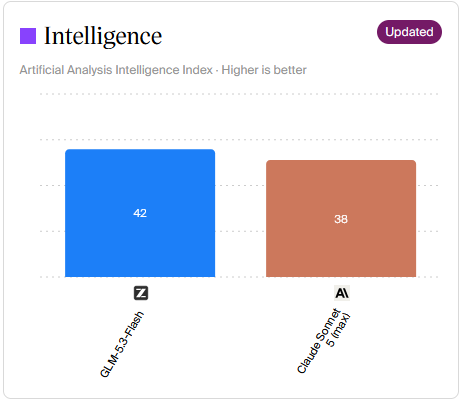
The caveat here is that the prompts might be used for training, which is often a deal breaker using these models in a company setting or if privacy is a concern.
Using Claude Code with other providers
If you don’t feel like leaving your preferred agent, there are sometimes ways to use it with other providers.
For example, Claude Code can be hosted on companies’ own infrastructure, if needed, so there is an option to tell Claude Code where the “server” is. This is done by passing the URL of the server to Claude Code using ANTHROPIC_BASE_URL environment variable.

Some LLM providers, like DeepSeek, take advantage of this mechanism to have their own, lower cost, models available to use with Claude Code that you already have installed.
They do this by providing an Anthropic-compatible API, while running their own models behind the API.
This means that if we set these environment variables prior to running Claude Code (we can save this in ~/.bashrc):
export ANTHROPIC_BASE_URL=https://api.deepseek.com/anthropic
export ANTHROPIC_AUTH_TOKEN=<your DeepSeek API Key>
export ANTHROPIC_MODEL=deepseek-flash[1m]
export ANTHROPIC_DEFAULT_OPUS_MODEL=deepseek-flash[1m]
export ANTHROPIC_DEFAULT_SONNET_MODEL=deepseek-flash[1m]
export ANTHROPIC_DEFAULT_HAIKU_MODEL=deepseek-flash
export CLAUDE_CODE_SUBAGENT_MODEL=deepseek-flash
export CLAUDE_CODE_EFFORT_LEVEL=max
export CLAUDE_CODE_AUTO_COMPACT_WINDOW=786432
we will have Claude Code on our machine making calls to lower cost DeepSeek models!
We can replicate the same setup with Codex, as well. It is configured using a config file rather than environment variables, but the principle is the same - point the agent to an alternative “server” address.
Mix & Match Harnesses and Models
To make this process easy for users, without fiddling with environment variables, OpenRouter has released a tool called Ori Harness. Once installed, you run the command ori and pass it an argument like claude, codex or any of the currently supported harnesses .
For example, running claude locally as we normally do and running /model command (inside Claude Code) we get the regular offering of models
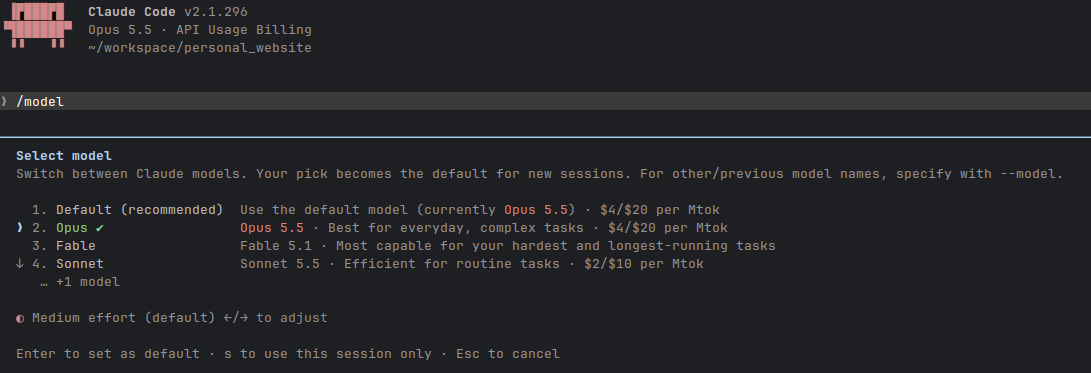
But when we run
ori claude
we see Claude started again, only this time with a ton of models to choose from!
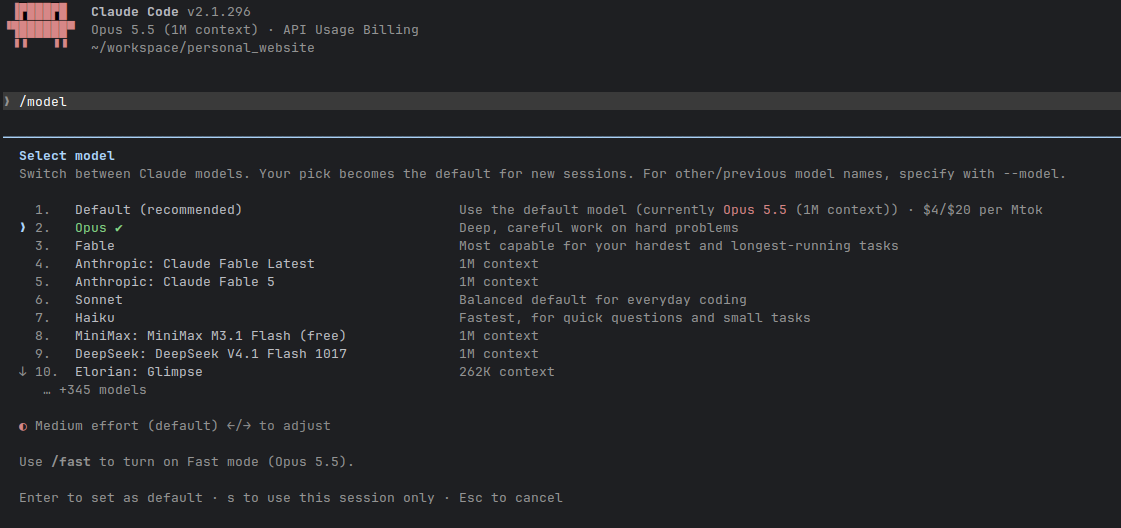
This way we get to keep our agent/harness of choice, while enjoying the reduced API pricing or even having it for free.
Although practically using Ori doesn’t make any difference than setting environment variables on our own, it’s worth noting that in the former case the requests will go through OpenRouter, e.g. local machine -> OpenRouter -> DeepSeek API instead of directly local machine -> DeepSeek API
Important notes on pricing and savings
While the ~80-90% discount for comparable performance sounds great, there is one subtlety when it comes to individual subscriptions (i.e. non-corporate accounts).
Although I couldn’t find Anthropic (or any other major provider) explicitly mentioning subsidies, there is strong evidence that individual subscriptions are heavily subsidized compared to the corporate plans that are billed per token and often capped at X dollars per user per month.
One way of verifying this yourself - for example for Anthropic - is to go back to any of the previous sessions and type /usage command. It will show the total price for that session, and number of input/output and cached tokens per mode, as if it were billed using API pricing.
We could then go through each session and add costs. Here’s an example of a longer session I ran
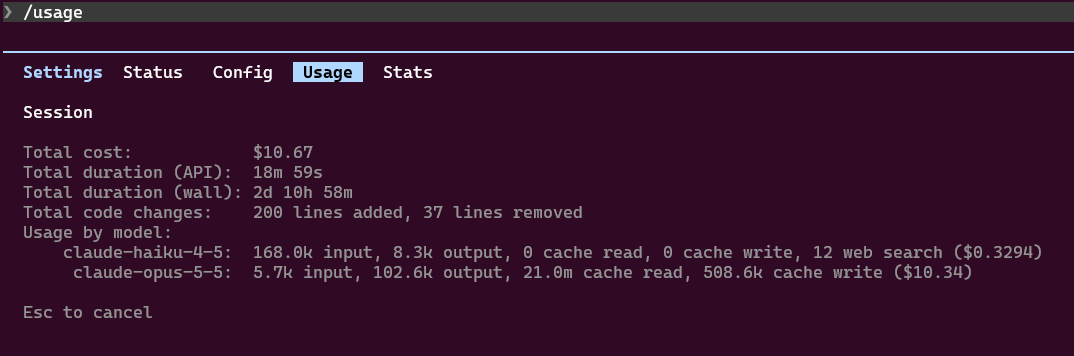
This was $10.67, and I didn’t even get to 50% of the daily limits, never mind the weekly or monthly ones!
There are even tools online (or you could have LLM generate a script for you) for calculating the actual costs as if billed per API pricing.
This means that for a fixed price monthly individual subscription you would get more value even than with using third-party APIs.
Time will tell if subsidized pricing will be sustainable, and if not, that will make the Harness + third party API approach all the more viable.
So which approach to use then?
For the time being, while the models are subsidized, and if you’d like to pick only one of those approaches, if:
- your monthly usage is less than the cost of the lowest cost subscription (typically $20 per month)
- you are using more advanced models only sporadically
- you prefer experimenting with different models
- your use case can be met with free models
a better option might be Harness + another model (or even the original model, but through OpenRouter, for a pay-as-you-go model).
On the other hand, if:
- Your monthly usage is more than the cost of the lowest cost subscription (typically $20 per month)
- You are using more advanced models on a daily basis
- You have one or few models of choice that you’re happy with and prefer using only them
then a better option might be a subscription from that AI lab.